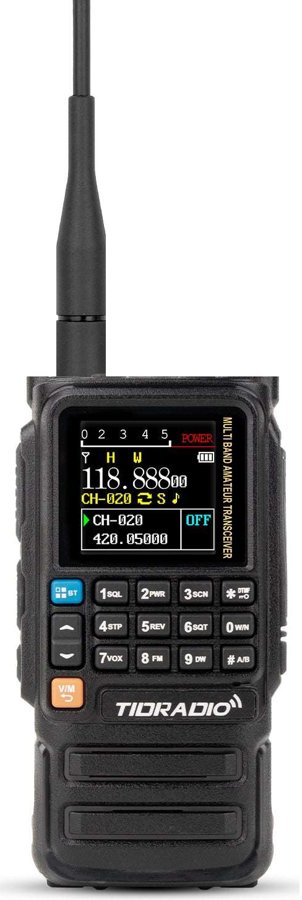
TIDRADIO TD-H3
The app can program it over Bluetooth; the steps below use the keypad so nothing else is needed.
Photo: TIDRADIO product photo
The keys you will use
- Knob on top
- turns the radio on and sets the volume. Turn until it clicks, then about a third of the way.
- PTT
- the big button on the side. Push to talk, let go to listen.
- Side keys
- the two small buttons under PTT: the upper one opens the squelch so you hear everything, static included; the lower one is the flashlight. Both can be reassigned in the menu, so if yours do something else, that is why.
- MENU
- opens the settings. Inside a setting, MENU also means "start changing it" and "save it".
- ▲ ▼
- move through the settings, change a value, or nudge the frequency.
- EXIT
- backs out one level, and leaves the menu.
- VFO/MR
- switches between typing a frequency (the screen shows a frequency) and a saved channel (the screen shows a channel number).
- A/B
- the screen shows two lines, A and B; A/B swaps which one is live.
- ✱
- a short press starts a scan; hold it to lock or unlock the keys.
- #
- swaps high and low power.
- Number keys
- type a frequency.
How the menu works
The settings are one list you scroll by name, not by number, and every change goes the same way:
- Press MENU. The screen shows a setting's name.
- Press ▲ ▼ until the one a step names shows (SQL, STEP, SFT-D, OFFSET, T-CTCS, TXP and so on).
- Press MENU once more to start changing it.
- Press ▲ ▼ to pick the value, or type digits where a step says so.
- Press MENU to save. Press EXIT to leave the menu.
The TIDRADIO phone app can program every channel over Bluetooth and is the easier way once you have more than a few; the steps here need only the keypad. If a key does nothing, the keys are locked: hold ✱ for two seconds. Written from the radio's menu list, not its printed manual: send the manual and this page gets the same per-key detail as the QRZ-1's.
Set it up, in this order
- Squelch
Menu → SQL → 3.
- Frequency step
Menu → STEP → 5K.
- VFO mode
Press VFO/MR until a frequency shows. Menu → DUAL WATCH → OFF for now.
- Simplex first
Type 146520. Menu → SFT-D → OFF. Menu → T-CTCS → OFF.
- Offset for a repeater
Menu → OFFSET → 0.600 on 2 m, 5.000 on 70 cm. Menu → SFT-D → + or − as the record says.
- Tone
Menu → T-CTCS → the tone from the record. R-CTCS off.
- Power
Menu → TXP → HIGH.
CHIRP knows this radio as TIDRADIO TD-H3: you can load the repeaters from Near you into channels later; for the first contact the steps above are enough.