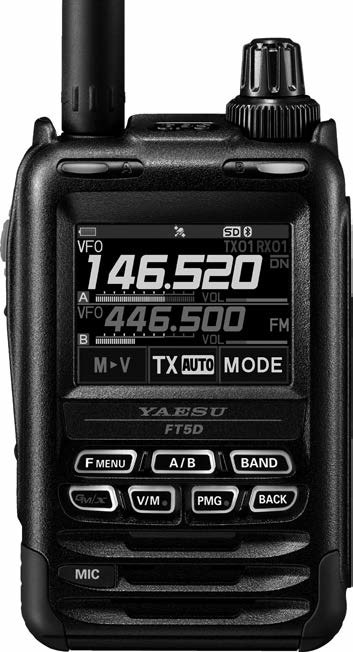
Yaesu FT5DR
A colour touch screen, a dial and eleven keys; most settings are a touch away instead of a numbered menu. The names below are the ones printed on the radio and in its manual. Digital C4FM and analogue FM both live here; for a first contact, FM through a repeater is all you need.
The keys you will use
- Power (lock) switch
- the small button on the side, under the two others. Hold it to turn the radio on or off. A short press locks or unlocks the keys and the dial.
- PTT
- the big button on the side. Push to talk, let go to listen.
- MONI/T-CALL
- the small button just under PTT. Hold it to hear everything on the frequency, static included.
- SQL
- the small button above PTT. Press it, then turn the VOL knob to set how much noise the radio hides.
- DIAL knob
- the outer knob on top. Turns the frequency up and down, and picks values in a menu.
- VOL knob
- the inner knob on top. Volume, and the squelch level after SQL.
- Touch screen
- touch and hold the frequency to get a number pad; touch a menu item to open it.
- F menu
- a short press shows the function menu (TXPWR, REV, SQL TYPE and the rest); hold it for a second to open the Setup Menu.
- A/B
- the screen shows two bands, A and B; A/B swaps which one you are working. Hold it to show one band only.
- BAND
- moves the working band to the next frequency band; 144 and 430 are the two you want.
- V/M
- switches between typing a frequency (VFO) and a saved channel (memory). Hold it to save the frequency you are on.
- BACK
- one step back in any menu.
- GM, PMG
- the group monitor and the primary memory group; nothing here needs them.
How the menu works
There are two menus, and both are touch:
- The **function menu**: press F menu once. Touch the item you want (TXPWR for power, SQL TYPE for the tone), turn the DIAL knob to the value, then press PTT to save and leave. Two pages: touch FWD or BACK at the bottom right to see the rest.
- The **Setup Menu**: hold F menu for a second. Touch a group (CONFIG, SIGNALING, TX/RX), then the numbered item, then turn the DIAL knob to the value. Press PTT to save and go back to normal, or BACK to go up one level.
The repeater shift is automatic (ARS): tune to a repeater's output and the radio sets the direction and the 0.600 or 5.000 offset by itself, with a small arrow above the frequency. If a key does nothing, the keys are locked: press the power switch once. If the screen shows a channel name where you expect a frequency, press V/M once.
Set it up, in this order
- Charge it and put it together
Charge the battery with the SAD-25 charger until its light says it is done. Slide the battery on until it clicks, and screw the antenna on clockwise until it is snug. Never press PTT without the antenna on.
- Turn it on and set the volume
- Hold the power switch until the screen lights. The first time, the radio asks for your callsign: turn the DIAL knob to each letter, touch the arrow to move on, and press PTT when it is done.
- Hold MONI/T-CALL and turn the VOL knob until the static is comfortable, then let go.
- Start from the factory settings
If somebody set the radio up before you, start clean. Turn the radio off, then hold F menu, A/B and BAND together while you turn it on, and touch OK. Everything in memory is erased, so only do this on a radio that is yours to reset.
- One band on the screen
- Hold A/B for a second until only one band shows. Everything below happens on that band.
- Press BAND until the frequency starts with 14 (2 m) or 43 (70 cm).
- Squelch
- Press SQL, then turn the VOL knob until the static stops. One or two clicks more than that is plenty. Press PTT to leave it.